AI Automation for Small Businesses: 7 Quick Wins
AI Automation for Small Businesses:
7 Quick Wins
What if your small business could handle repetitive tasks without requiring your constant attention?
Customer inquiries need responses, leads require follow-ups, invoices need processing, and appointments require coordination. Managing these responsibilities manually can leave little room for serving customers, developing new opportunities, and focusing on business growth.
AI automation for small businesses combines artificial intelligence with rule-based workflows to streamline everyday operations. It can route incoming leads, organize business information, draft customer responses, and generate performance reports while reducing manual work.
But which tasks are worth automating first? Choosing the wrong process can create unnecessary complexity instead of improving efficiency. This guide covers seven tasks worth automating, how to pick your first one, and the mistakes to avoid. Start with the task, not the tool.
Why AI for Business Automation Is Taking Off Now
AI automation for small businesses went mainstream once the software stopped needing a developer. We see this shift every month in client intake. No-code automation platforms and AI assistants are now baked into the tools owners already use. Cheaper APIs mean a solo operator can wire together a working system over a weekend.
One distinction worth settling before you buy anything:
-
Rule-based automation runs when conditions match a rule you wrote. Zapier workflows, Google Sheets macros, recurring QuickBooks invoices. No AI inside.
-
AI-powered automation uses a model to read, write, classify, or decide. ChatGPT drafting replies, Jasper writing captions, Gong summarizing calls. The model does the judgment.
Most real stacks blend both. A Zapier trigger catches the form submission (rule-based). A GPT-powered step drafts a tailored reply (AI). A rule-based step files the contact in the CRM.
7 Tasks AI Automation for Small Businesses Can Handle Today
The best candidates share three traits: they repeat, they follow clear rules, and they cost you money or goodwill when they slip. These seven qualify for most small operators. The small business automation tools below cover each category without a developer on staff.
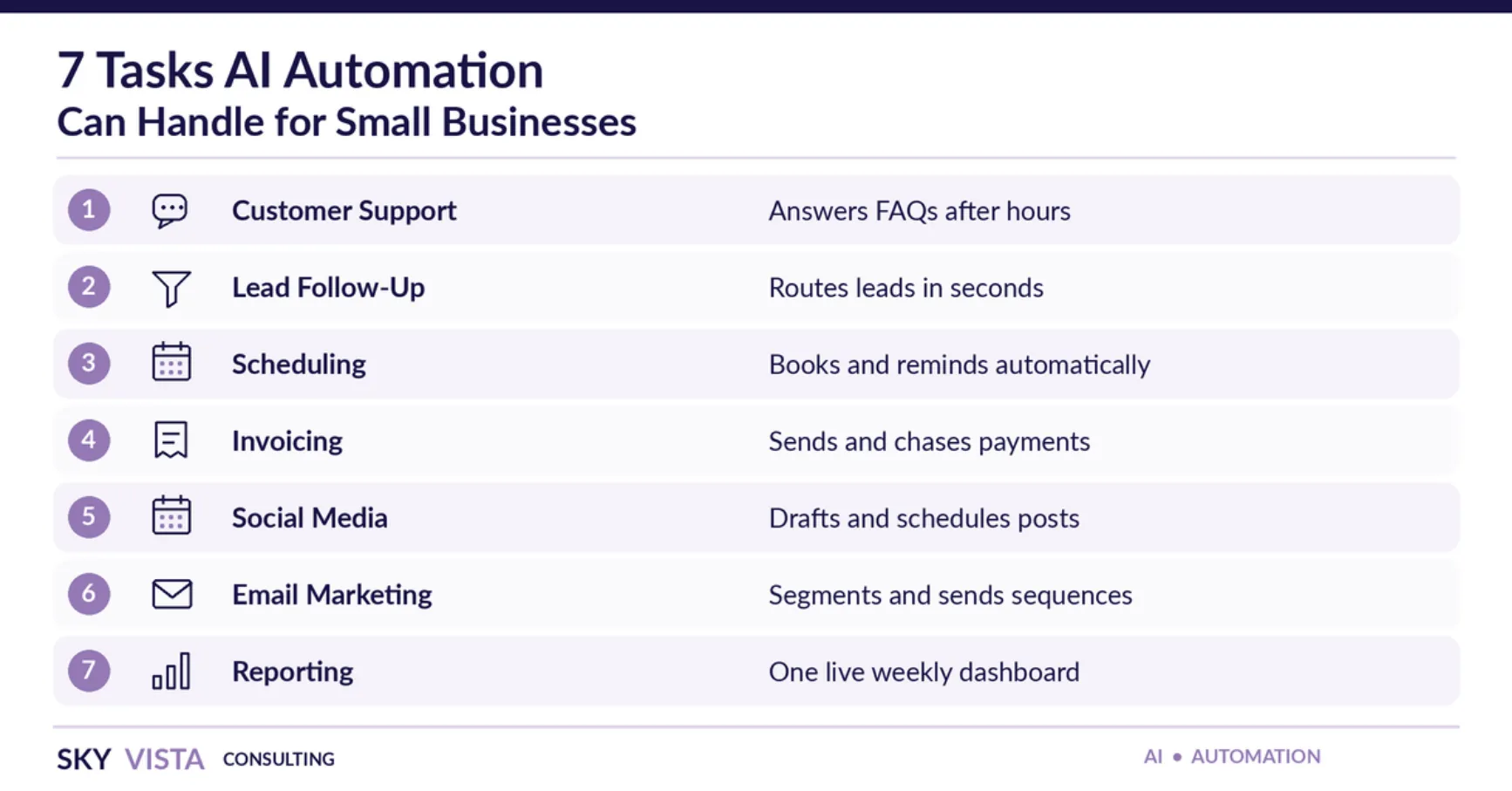
1. Customer Support and FAQ Responses
Intercom Fin, HubSpot’s AI chatbot, and Zendesk AI agents learn from your FAQ pages and past tickets. They answer common questions around the clock and hand complex ones to a person.
To get started, pull your 20 most-asked questions from your inbox and voicemail. Add a rule that routes complaints, refunds, and custom quotes to a person. Switch on after-hours mode first, where the risk is lowest.
2. Workflow Automation for Small Business Lead Follow-Up
When a form comes in at 10 p.m., Zapier, Make, or HubSpot Workflows tag the lead and route it into your CRM. A short auto-reply goes out within minutes. To make it work, add service, zip code, and budget fields to your form, then send qualified leads a “call today” task.
3. Appointment Scheduling and Reminders
Calendly, Acuity, and Google Calendar let clients book their own slot and reschedule without phone tag. Reminders at 24 hours and 2 hours are a simple way to cut no-shows. Create one booking link per service and place it in your email signature and Google Business Profile so clients can book after hours.
4. Invoicing, Billing, and Payment Reminders
QuickBooks Online, Xero, FreshBooks, and Stripe send and chase invoices on a schedule you set, with nudges at 7, 14, and 30 days overdue. Before you switch it on, record your average days-to-pay. Compare it after one quarter so you measure the change instead of assuming it.
5. Social Media Scheduling and Content Drafting
Buffer AI Assistant, Later, Metricool, and ChatGPT draft captions in your brand voice and queue posts across platforms. A simple routine works well: film for an hour each week, give the tool three captions you like, and queue two weeks of posts.
6. Email Marketing Segmentation and Sequences
Mailchimp, Klaviyo, and ActiveCampaign segment your list by behavior and predict the best send time. Start with three segments: active customers, leads, and lapsed contacts. Write one short sequence for each. Keep the lapsed-contact message light, like a check-in.
7. Reporting and Performance Dashboards
Looker Studio, Databox, or HubSpot Reporting pulls Google Ads, Meta, your website, and your CRM into one live view. A plain-English summary tells you what moved last week. Pick the five numbers you check most and schedule them to land in your inbox each Monday.
How to Automate Your Business: Picking Your First Task
Choose the task that repeats, costs real money when it slips, and fits on one sheet of paper. If you cannot sketch the workflow in ten lines, it is not ready.
Score your top three candidates against three questions:
-
Is it done the same way every time?
-
Does a slip cost real money or a real customer?
-
Can you describe the inputs, outputs, and exceptions in plain words?
Lead follow-up and invoicing usually pay back fastest. Then start small:
-
Map the process by hand, including every exception.
-
Pick one tool your team already uses.
-
Build one trigger and one action, and test it for a week.
-
Review weekly for a month, then expand.
Automation compounds when each step rests on a clean one before it. AI automation for small businesses works best when the first win lands in under thirty days.
Automation in Small Business: Mistakes and Risks to Watch
Most failures trace back to the process, not the tool.
• Automating an unmapped process. Write the workflow on paper first.
• Skipping human review. Keep one-tap approval on customer-facing messages for ninety days. AI models sometimes invent facts, so check quotes and medical or legal language.
• Ignoring data privacy. Check each platform’s data policy and turn on two-factor authentication. Regulated industries need a BAA before client data touches an AI tool. The FTC’s cybersecurity guidance for small businesses is a useful starting point.
• Automating judgment calls. Keep pricing exceptions, complaints, and refunds with a person.
Review your stack quarterly, since tools change pricing and policies.
AI Automation for Business Growth: Where to Go From Here
The biggest win from AI automation for small businesses is not a shorter task list. It is more time to sell and serve customers. Pick one task this quarter and let hours saved guide the next.
Week one usually looks like this: a 60-minute workflow interview, a map of your current process, and one trigger-plus-action built live in your own tools. You test it with real data for a week before anything else is scaled. Most owners hit their first measurable time saving inside three weeks.
If mapping is where you get stuck, Sky Vista Consulting’s AI Agency team audits your stack and scopes the first automation. We build it inside the tools you already own and tie it back to real growth metrics through our business consulting services.
Related Article: The Best AI Tools for Small Business in 2026: A Complete Guide
Frequently Asked Questions
1. What is AI automation for small businesses?
AI automation for small businesses uses artificial intelligence and workflow tools to handle repetitive work. That includes customer questions, scheduling, invoicing, and lead follow-up. The goal is freeing staff to focus on customers.
2. Is business automation AI affordable for a small team?
Yes. Most platforms offer free starter tiers, and paid plans scale with volume. Zapier, Buffer, Mailchimp, and HubSpot all have entry-level plans. Start with one workflow and measure the time it saves.
3. Which tasks should a small business automate first?
Start with repetitive, rule-based tasks. Lead follow-up, scheduling, and invoicing usually pay back fastest.
4. Will AI replace my employees?
Usually not. Routine tasks move to software, while people handle relationships, strategy, and judgment calls.
5. How long does it take to see results?
Simple workflows like invoice reminders or lead routing can show results within 30 days. Full CRM integrations take two to three months to tune, so track weekly hours saved against your baseline.